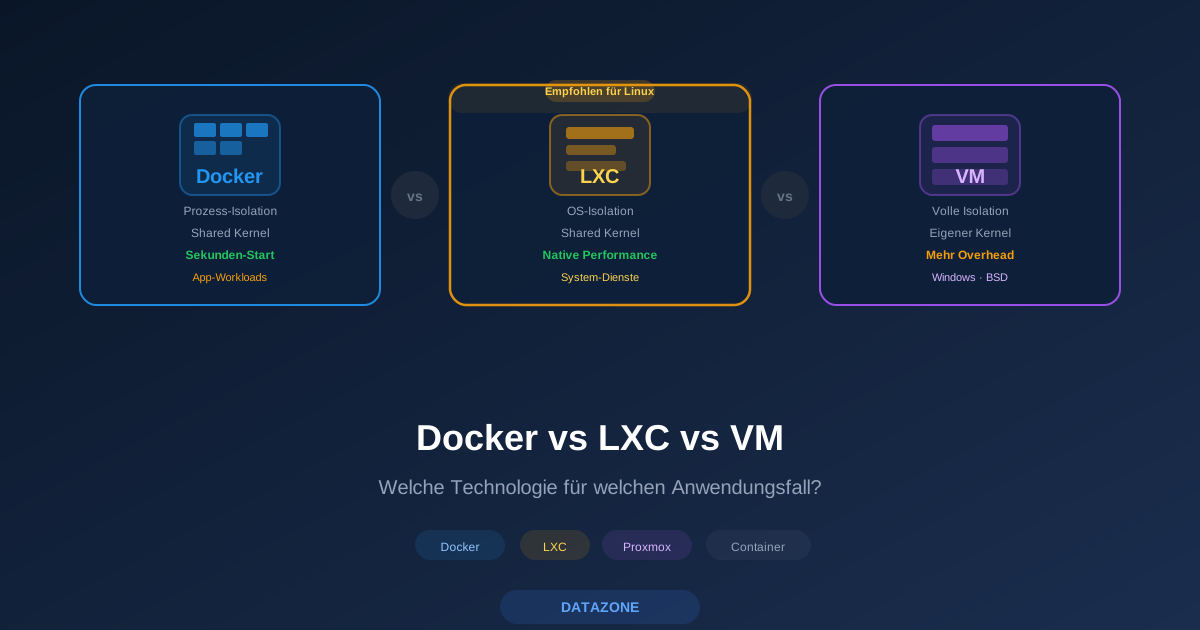
When planning IT infrastructure, you will inevitably face the question: virtual machine, LXC container, or Docker? All three technologies isolate workloads — but in fundamentally different ways. The right choice depends on security requirements, performance goals, and the specific use case. This article compares the three approaches and shows when each solution makes sense.
Three Approaches, One Goal
Virtualization means abstracting resources from physical hardware. The three common methods differ in the depth of that abstraction:
- Virtual machines (KVM/QEMU) emulate complete hardware. Each VM runs its own kernel, bootloader, and drivers — fully isolated from the host.
- LXC containers share the host system’s kernel but isolate the filesystem, network, and processes through Linux namespaces and cgroups. They behave like lightweight virtual machines.
- Docker/OCI containers also use namespaces and cgroups but are designed for individual applications. A Docker container packages an application with all its dependencies into a portable image.
Virtual Machines: Maximum Isolation
VMs provide the strongest isolation because each instance runs its own kernel. A compromised kernel inside a VM has no access to the host or other VMs. This makes VMs the first choice for multi-tenant environments, security-critical workloads, and operating systems that are not based on Linux.
Advantages: Complete kernel isolation, any operating system (Windows, BSD, Linux), mature live migration, independent kernel updates.
Disadvantages: Higher resource consumption (dedicated kernel, RAM overhead of 256–512 MB per VM), longer boot times (30–90 seconds), larger disk images.
LXC Containers: The Best of Both Worlds
LXC containers run a full Linux userland — including an init system, package manager, and SSH — but without their own kernel. They start in 1–3 seconds, consume barely more resources than the services themselves, and can be managed like traditional servers.
Advantages: Near-native performance, minimal overhead (no kernel duplication), fast startup, simple management through Proxmox.
Disadvantages: Linux guests only, shared kernel (security implication), limited kernel module usage, no independent kernel updates.
Docker/OCI Containers: Application Focus
Docker packages a single application with its dependencies into a standardized image. Containers are not managed like servers but defined declaratively through docker-compose.yml or Kubernetes manifests. They are ephemeral, reproducible, and ideal for microservices.
Advantages: Highest portability, massive image ecosystem (Docker Hub), infrastructure as code, rapid scaling, startup in under one second.
Disadvantages: Not suited for stateful services without volumes, network complexity in multi-host setups, shared kernel, less suitable for traditional system administration.
Comparison Table
| Feature | VM (KVM/QEMU) | LXC Container | Docker/OCI |
|---|---|---|---|
| Isolation | Full (own kernel) | Namespace-based (shared kernel) | Namespace-based (shared kernel) |
| Performance | ~95% native | ~99% native | ~99% native |
| RAM overhead | 256–512 MB per VM | 5–20 MB per container | 5–15 MB per container |
| Boot time | 30–90 seconds | 1–3 seconds | < 1 second |
| Operating systems | Linux, Windows, BSD | Linux only | Linux only |
| Persistence | Full disk image | Persistent rootfs | Ephemeral (volumes required) |
| Networking | Virtual NICs (bridge/VLAN) | veth pairs (bridge/VLAN) | Docker network (NAT/bridge) |
| Use case | Legacy apps, Windows, compliance | Linux services, hosting, infra | Microservices, CI/CD, apps |
| Proxmox support | Native (KVM) | Native (LXC) | Inside LXC or VM |
When to Use Which Technology?
The decision follows a simple logic:
Choose a VM when:
- Windows or a non-Linux OS is required
- Maximum isolation is mandatory (compliance, multi-tenant)
- The workload requires custom kernel modules
- Live migration between hosts is essential
Choose LXC when:
- Linux services should run with minimal overhead
- The container is managed like a traditional server
- Proxmox is the management platform
- Performance is critical (database servers, file servers)
Choose Docker when:
- Applications must be portable and reproducible
- Microservice architectures are being implemented
- CI/CD pipelines require automated deployments
- The ecosystem of pre-built images is needed
Combined Approaches
In practice, these technologies are not mutually exclusive. Common combinations include:
Docker inside LXC: An LXC container with nesting enabled (features: nesting=1) can run Docker. Proxmox manages the LXC container, Docker manages the applications within it. This combination offers low overhead while leveraging the Docker ecosystem — ideal for home servers and small production environments.
Docker inside a VM: For maximum isolation, Docker runs inside a full VM. This is the recommended approach for multi-tenant platforms or when containers execute untrusted code.
Proxmox Integration
Proxmox VE supports VMs (KVM) and LXC containers natively through the same web interface. Both types can be managed with backups, snapshots, HA clustering, and live migration. Docker is not managed directly by Proxmox but runs inside a VM or LXC container.
A typical Proxmox setup in practice: security-critical services like firewalls and databases run in VMs, infrastructure services like DNS, DHCP, and reverse proxies in LXC containers, and applications like wikis, monitoring, or ticketing systems as Docker containers within an LXC container.
Security: Understanding Kernel Sharing
The most important security difference: LXC and Docker share the host’s kernel. A kernel vulnerability potentially affects all containers. VMs, on the other hand, also isolate the kernel — a kernel exploit inside a VM remains confined to that VM.
Containers therefore require additional hardening measures: use unprivileged containers, enable AppArmor/seccomp profiles, restrict capabilities, and keep the host kernel up to date. In Proxmox, LXC containers run as unprivileged by default — a sensible standard.
Resource Overhead Comparison
On a host with 64 GB RAM and 16 CPU cores, the difference becomes clear: with VMs, you can typically run 10–15 instances before RAM is exhausted. With LXC containers, that number rises to 50–100 instances because per-container overhead is minimal. Docker containers scale similarly to LXC, though actual consumption depends heavily on the application.
Monitoring with DATAZONE Control
Regardless of the chosen technology, centralized monitoring is essential. DATAZONE Control monitors VMs, LXC containers, and Docker containers in a unified interface. CPU, RAM, storage, and network traffic across all three virtualization types feed into a single dashboard — including alerting for resource bottlenecks, failed containers, or unusual behavior.
Planning a virtualization environment and need help with the architecture? Contact us — we advise on the optimal combination of VMs, containers, and Docker on Proxmox VE.
More on these topics:
More articles
TrueNAS as an Immutable Backup Target for Veeam & Proxmox (S3 Object Lock)
Immutable backups against ransomware: how to use TrueNAS as an S3-compatible immutable target with Object Lock for Veeam and Proxmox Backup Server — on-premises, without cloud egress.
TrueNAS Proxmox plugin 25.10.6: four observations from our test lab, fed back to iXsystems as a partner
Early adoption means helping to shape. We run the official TrueNAS storage plugin for Proxmox VE productively and document here what we observed in version 2.1.17+deb1 on PVE 9.2.11 and TrueNAS SCALE 25.10.6 — including workarounds for the community and a note on how we fed it back to iXsystems.
Proxmox vs. VMware vSphere 8 -- 2026 update: the state of play after two years of Broadcom
Proxmox vs VMware 2026 -- an honest comparison against vSphere 8 after two years of Broadcom. Where Proxmox has caught up, where vSphere still leads. From the trenches.